Skip to content

Email Templates

On-brand emails, every send.

Our email template is built to reflect the Oolio brand across every marketing and campaign communication. It's used across all products — swap the logo in the header and footer to match the product you're sending from, update the social links and address details, and it's ready to go. Everything else stays consistent.

Oolio email templates sections and elements

1. Header

The header features the product logo centred on a white background at 120px wide. Use the purple logo variant — primary Oolio logo for company-wide communications, or the relevant product logo when sending from a specific product. Do not add additional elements, text, or imagery to the header banner.


2. Greeting and intro

Immediately after the header, with no title or section above it. The opening line is personalised to the recipient, styled in bold and centred. It should clearly and quickly communicate the purpose of the email — one sentence is ideal. Think of it as the subject line's follow-through: the reader should know immediately why they're reading this.


3. Section styling

Body sections follow a consistent structure: an optional eyebrow text line above a bold section headline, followed by body copy in regular weight.

  • Default font: Arial 16px
  • Eyebrow text: Arial 14px, uppercase
  • Section padding: 30px left and right, 20px top and bottom
  • Between sections: 20px gap
  • Padding and spacing can be adjusted by eye as appropriate

Sections can use different highlight colours. When a highlight colour is applied, the headline, bold text, and buttons within that section take on that colour. Use highlight colours from the approved brand palette only.
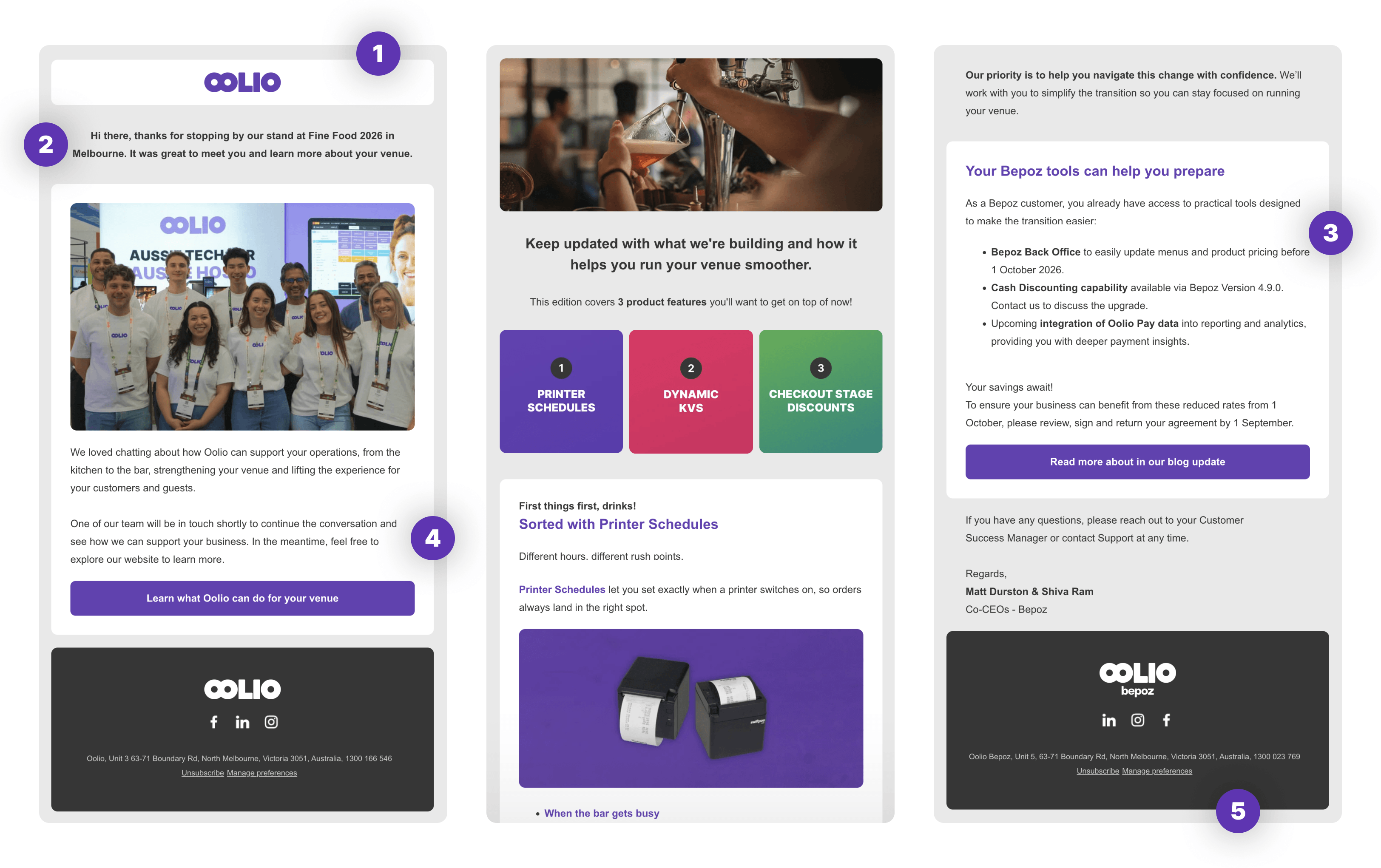

4. Element styling

Images
Images should be full width, whether inside or outside a section. Images inside a section still respect the section padding. All images use a border radius of 10px.

Buttons
Buttons are full width with bold centred text at 16px Arial. The default button style is Oolio Purple background with white text. When a section uses a highlight colour, the button takes on that highlight colour instead. Do not use custom button colours outside the approved palette.

5. Footer

The footer features the product logo centred in white on a dark charcoal background at 120px wide, followed by white social icons, the relevant business address, and subscription management links. Update the logo, social links, and address to match the sending product or business unit. Subscription management links are mandatory and must not be removed.


Usage rules

  • Swap the header and footer logo to match the product you're sending from
  • Use the purple logo in the header and the white logo in the footer
  • Both logos should be displayed at 120px wide
  • The greeting and intro paragraph is the first element after the header — do not add a title or section above it
  • Default font is Arial 16px — do not use custom fonts in the email body
  • Eyebrow text is Arial 14px uppercase
  • Section padding defaults are 30px left and right, 20px top and bottom — adjust by eye as appropriate
  • Highlight colours must be drawn from the approved brand palette
  • Subscription management links in the footer are mandatory — do not remove them

Need a variation outside the standard template? Contact Marketing and we'll get you what you need.